Welcome
 |
I build solutions for problems I encounter daily: online, in my smart home and in games. |
 Browser scripts for every kind of inconvenience on browser pages.
 Videogame mods for GTA with local AI: AI Chaos mod, AI enemy control and AI DYOM.
 Local email, calendar, docs, home assistant with smart object detection and descriptions.
 Creative problem solving in projects such as adding 4k textures to a PlayStation 1 game.
 Currently looking for an internship: Please feel free to contact here.
What I do
| A few things I've made: | |
| Untitled Car Combat Game project | Currently in prototyping phase of my own game concept |
| Game reverse-engineering & modding | Any engine, currently whatever games have communities that spark my interest |
 Vision, local AI, local hardware Vision, local AI, local hardware | Cameras around the house, feeding live descriptions right to my home assistant dashboard pi with AI hat+2 |
| Self-hosted infrastructure | Self-hosted e-mail, calendar, home automation |
Recent work
 GTA: San Andreas with local AI GTA: San Andreas with local AI |
| Vision AI watches you play, picks chaos mod effects that most challenge the player Combat AI possesses hostile units that in vanilla gameplay only know to move and shoot Lora trained my local AI on over 500 free DYOM missions, let it build one (purely for fun) |
 The Inquisitor mod for Demon Bluff The Inquisitor mod for Demon Bluff |
| One of the most anticipated games at Gamescom 2026 is Demon Bluff, a single player social deduction game. I challenged myself to get a custom social-deduction character mod finished before it began! Pick a player, learn their true role if they're corrupted and good. |
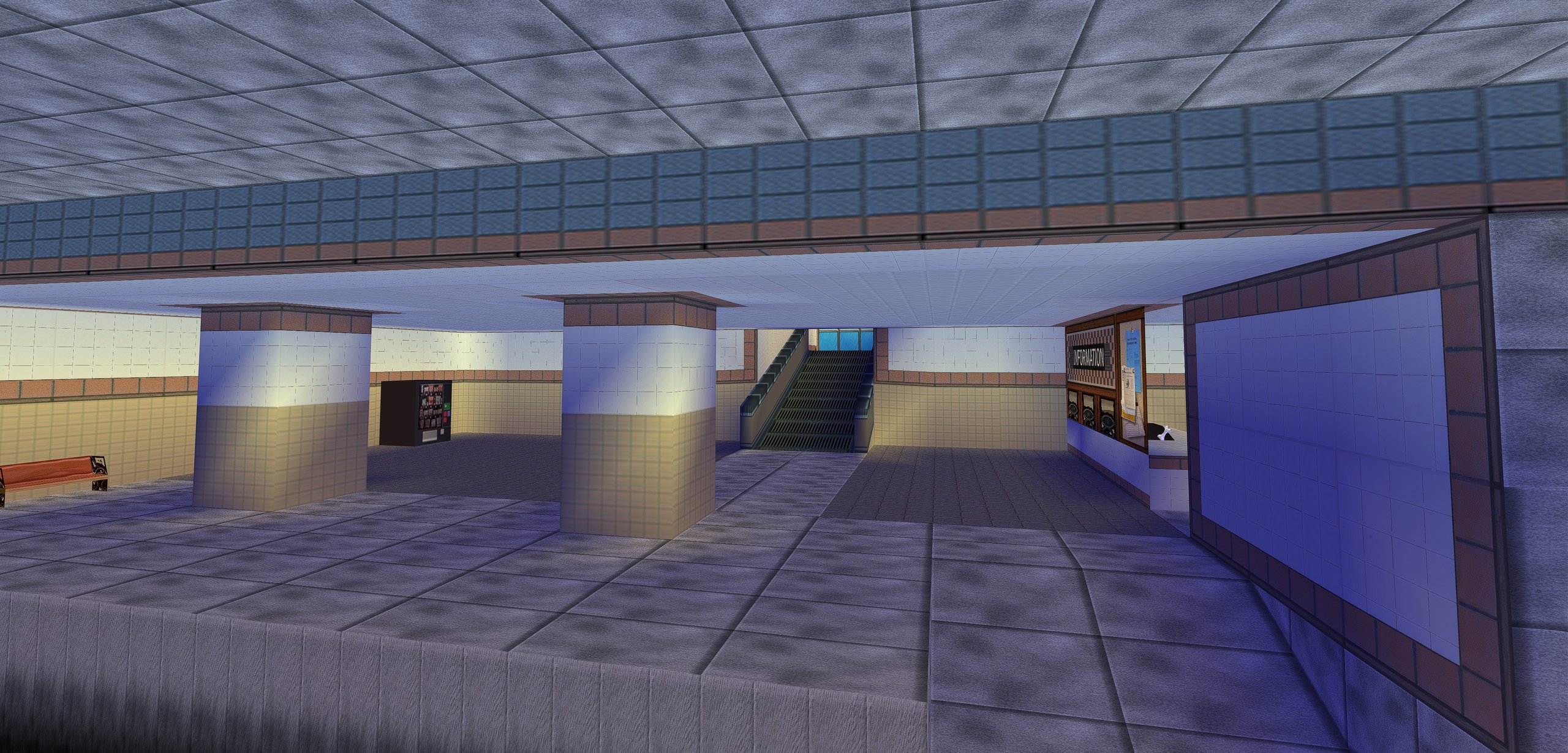
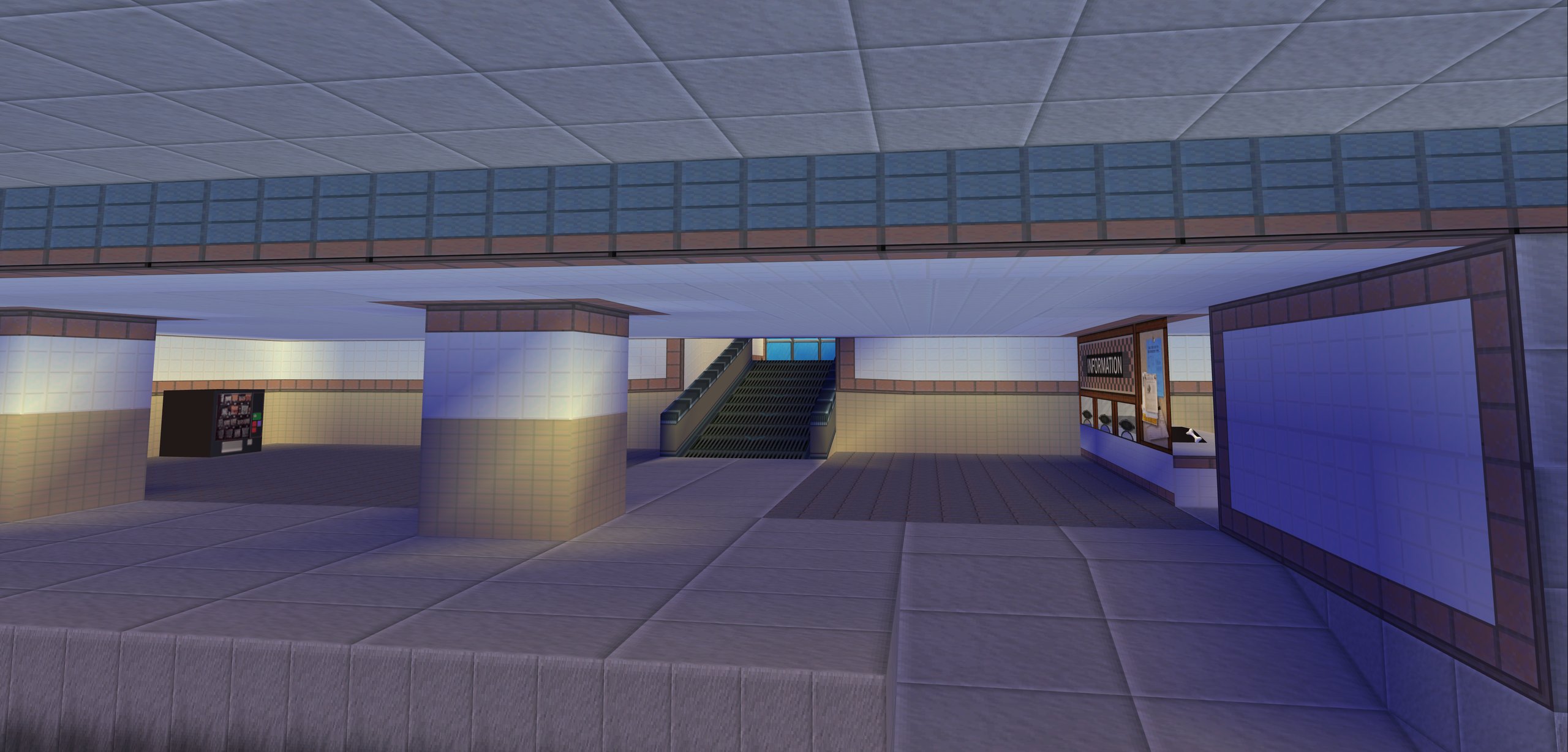
 102 Dalmatians, a playstation 1 game, upscale project 102 Dalmatians, a playstation 1 game, upscale project |
| Reverse engineered using Ghidra the engine's 256px texture clamp, built a similar patch to the 4GB Sims 3 patch. Then I proceeded to upscale all textures in one level and apply modern reshade systems. No remaster required! |
 Local research harness Local research harness |
| Cloud AI's are famously lazy and take conclusions way too early, so I built a harness that points multiple local AI's at each-other to judge where they come up short in order to bring complete and usable market and community research to me. I can visit 100 sites myself in order to find out what the audience wants, or I can focus on those who are familiar with a genre who then rate a new release in said genre for more valuable actionable unbiased feedback. This level of insight will always require a human in charge of AI. |
| Curiousness for what makes games fun and go viral |
| For Gamescom 2026, I've played every single demo of every game that is present on the floor, I've analyzed parallels between them and the early releases of previous games that went viral. It's a genuine fascination of mine to discover how sometimes one simple gameplay change is the difference between a marketing flop and a viral sensation. |
 Stalwart: Why I think outside the box, step up and solve annoyances others take for granted Stalwart: Why I think outside the box, step up and solve annoyances others take for granted |
| Being fed up with Gmail's constant AI features I didn't ask for, Outlook's restrictions on managing events through home automation, and the need for direct notifications for smart home detections around my house, I've set up my own Stalwart server, and it's been running like a dream, replacing both email and calendar. |
Work with me
- Interest: Game design, narrative design, structured and ethical AI use
 Experience in AI: It's my main hobby, I spend all my free time in multiple AI terminals.
 Experience in video game industry: Extensive playtester for Inscryption from early beta (Mar 2021) through launch playtest (Oct 2021). Currently studying Game Design.
 Want to learn more, need me, or just share what you're working on? send me a message
GTA San Andreas Mods
- I've always enjoyed "Chaos" mods, especially in the sandbox that is Grand Theft Auto. These chaos mods work by having a list of hundreds of possible effects, from spawning enemies near you to giving everyone big heads.
 These effects can either be random, or voted on by Twitch chat. Well, I'm not a streamer, and after having been unlucky to roll the "instant death" effect one too many times, I decided to build an AI harness that is hooked directly into the game state, aware of mission state, surrounding enemies, wanted level and more.
  Then the AI makes the most entertaining decisions on your behalf. Usually AI's are very narrow minded but forcing it to pick from a pool of 10 effects, priming it to pick effects that are genuinely relevant, and in this specific instance, AI thrived and brought genuine fun to such an old game!
 I've also experimented with having an AI take over the decisions of any nearby hostile npc's: you punch a pedestrian, they start running to a nearby car and try to drive you over. You play a regular mission, expect AI to know how to take cover and engage you with skill.
The Inquisitor, mod for Demon Bluff
- A mod I created for this Gamescom 2026 social deduction game.
Mods for 102 Dalmatians, originally a PlayStation 1 game.
 I needed a method to easily capture in-game screenshots at specific points to measure tiling and placement for detailed upscale work
 No such mod existed in the community of 102 Dalmatians: Puppies to the Rescue
- So I built one, on the community's DttR SDK
 I then used it to upscale textures in the game, as you can see on the sides of this page.
Raspberry Pi 5 Hailo vision pipeline
- Got tired of having to pay for a Ring doorbell subscription, and having to charge it..
- Solution: Frigate + YOLOv8m + Qwen3-VL-2B, both sharing one Hailo-10H NPU on a Pi 5
- Local doorbell over PoE, doorbell person events → live GenAI descriptions, fully on-device
- Breach detection: If the ethernet disconnects, the connection is shut down at the router
| Getting it to work properly: | |
| NPU sharing errors | Two models on one NPU, so I set up a shared-vdevice + round-robin architecture |
| VLM wedging under detector preemption | Self-healing reinit, verified recovered in ~20s |
| Context starvation | 2048-token VLM spent 96% of descriptions on the background → constrained prompt + fewer crops, now only 10% |
| Determinism | A/B tested: 0/24 repeat-consistent → 20/24 perfect descriptions at temp .1~.3, 4 images at a time with little to no hallucination |
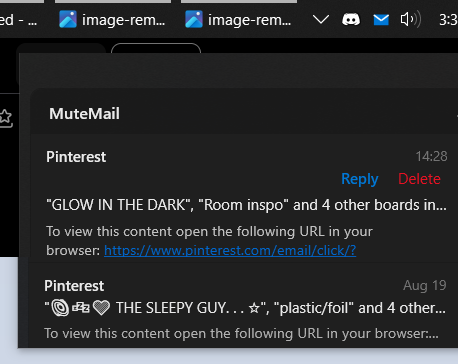
MuteMail
- When I made my local email server, I still end up using my internet browser to read mail
- Then I realized that since my email server is local, I can also make a tiny local desktop client to connect to it, reading and replying to mail as a windows tray icon, almost zero idle resources, small popup, never loads images unless you open the mail in-browser
- To make it blend in with Windows 10, I got inspired by the design of a volume control application called "EarTrumpet", which replicated the windows 10 volume control but with individual sliders for each application. So I chose to have that as the base for the looks
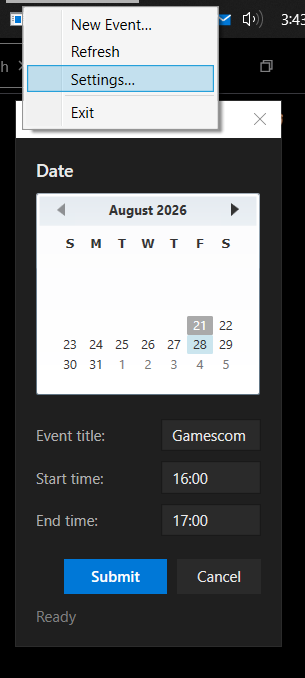
- The email server runs on Stalwart, which I later found out also does CALdav, meaning I can also move my closed source calendar over to my local setup. I wrote a program to extract calendar events of my previous calendar service, and imported the events back into mine, zero calendar data lost and no downtime
- My latest addition is being able to right-click the MuteMail tray icon to add a calendar event directly
- My mail and calendar are safely backed up across multiple drives, with nightly backups
- Can access my calendar events and e-mail anywhere, synced across all devices
click to enlarge
PhotoSorter
- I searched far and wide for a specific program to allow me to sort a complete photo dump from Google Drive, but nothing currently out there allows me to do so by pressing 1 numbered key per photo to instantly move it into the folder I want
- I built one: Open the folder you want to sort, and it will immediately present the first photo, plus a preview of the next three photos coming up on the sort for rapid processing
- First, name however many destinations you need. Press 1–9 to move the current photo into the folder name you set to each number, 0 to undo. Ctrl+Delete to delete. It remembers the last folder and position upon restart so you can continue where you left off
- 8K photo previews were laggy (144ms/127MB). I made it load only what the screen needs based on destkop resolution: 20ms/1.3MB (7x faster, 98% less memory)
- Autoplays and supports video files, including gifs disguised as videofiles, also 2x speed
 Based on, and a heavy rewrite of the upstream Taiko2k app in order to support a wide array of media formats, still working on licensing in order to be able to opensource it
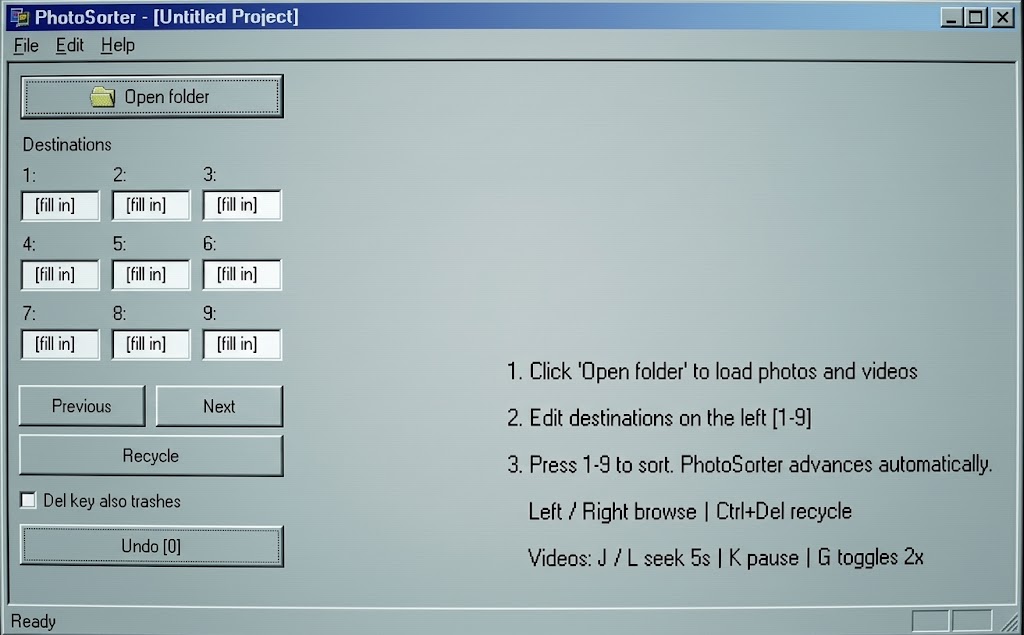
PhotoSorter: one keypress per item
Contact
- For getting in contact I recommend providing a personal website, social or LinkedIn account so I know it's a person I'm connecting to, plus your preferred platform of contact and handle. I'm available to get back to you in order of preference: Discord, Whatsapp, LinkedIn as well as every social media.
- Portfolio
Example of a videogame pitch deck and appendix I built for a university assignment
- Elsewhere
- Nexus Mods
- GitLab
- Greasyfork